12-Week Cash Flow Planner Pro
For contractors and project businesses running several jobs at once. Enter each job once, and the planner dates every deposit, progress and final payment, works out how late each client usually pays, and shows the first week your cash runs short.
Excel and Google Sheets. No subscription. No bank connection.
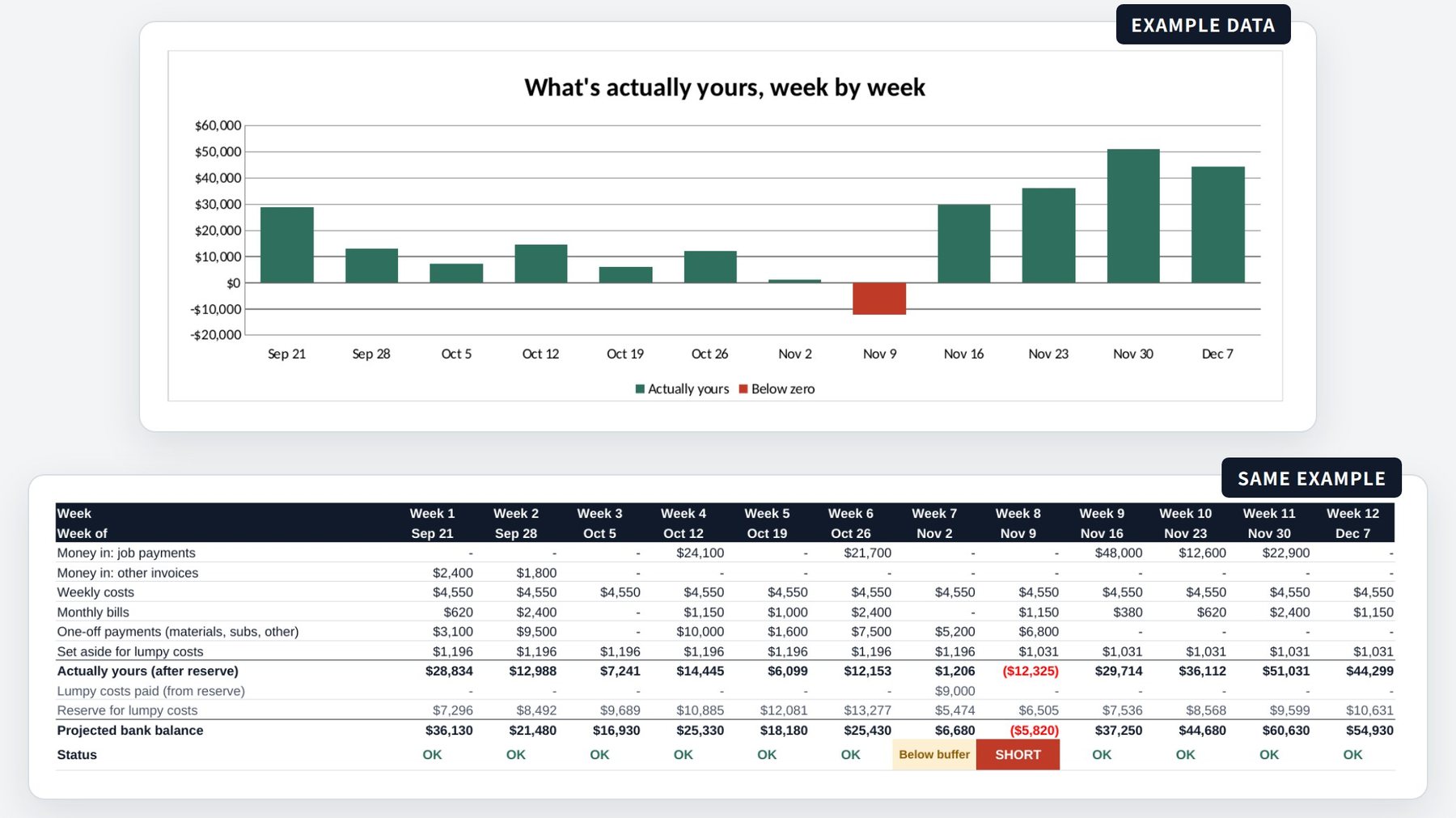
What Pro adds to the free template.
The free template plans cash one invoice at a time. Pro is built around jobs: enter a job once, and every payment from it lands in the right week.
| Feature | Free | Pro |
|---|---|---|
| 12-week forecast, chart and safe-to-spend | Included | Included |
| Weekly set-asides for taxes, insurance and other big bills | Included | Included |
| An expected paid date for every payment | Included | Included |
| How late each client usually pays | You type it in | Worked out from past payments |
| Jobs: deposit, progress and final payments dated from each job's start and finish | Not included | Included |
| Job costs and margin for each job | Not included | Included |
| Stress test: what if every client pays later? | Not included | Included |
| One-page summary you can print | Not included | Included |
| Price | Free | $17, one time |
A closer look.
Every screenshot shows the example business that comes filled in, so you can see it work before you add your own numbers.
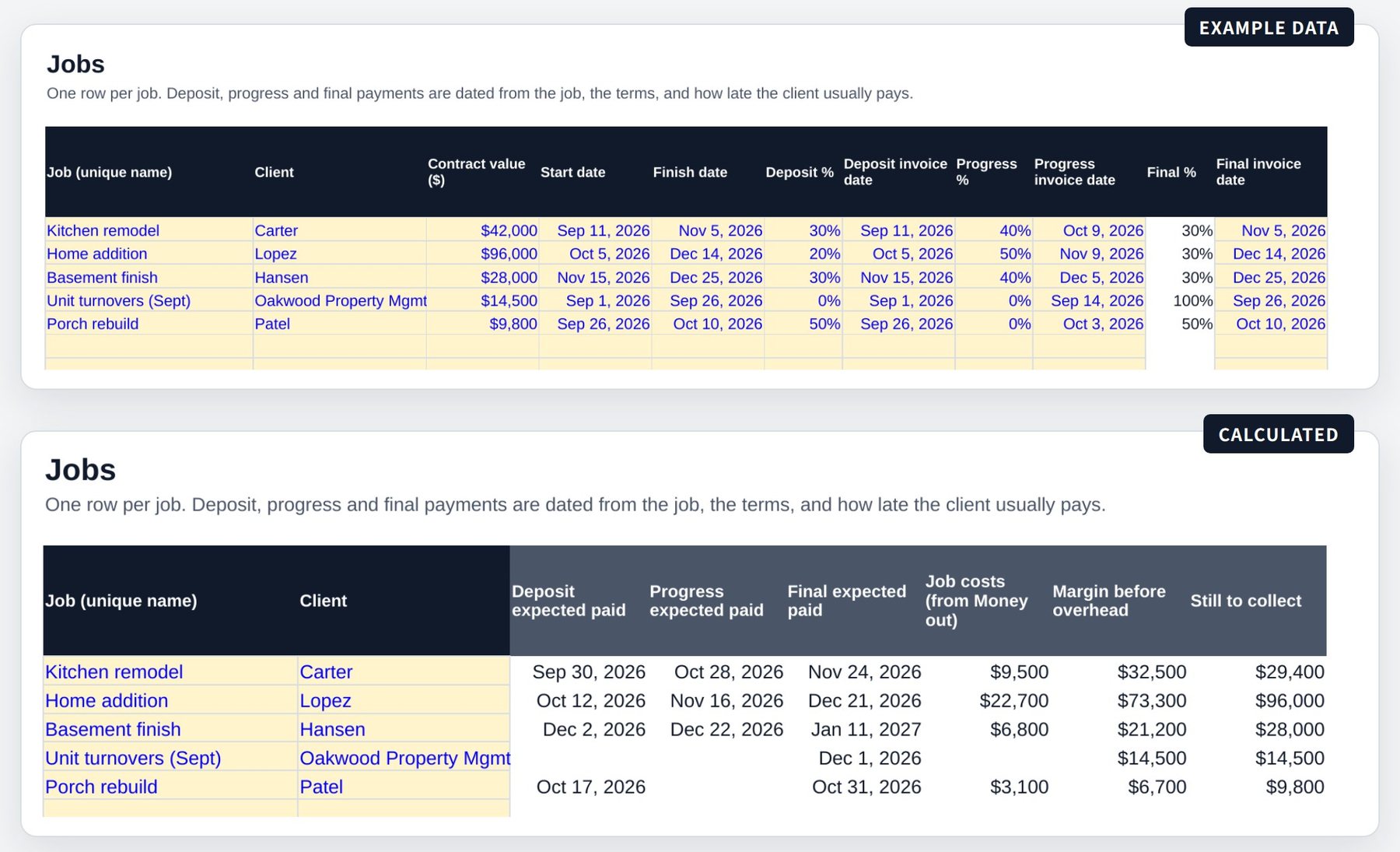
Enter a job once. Every payment gets a date.
Add the contract value, the start and finish dates, and how you bill it: a deposit, a progress payment and a final payment. The planner dates each one from your payment terms and how late that client usually pays, and adds up job costs and margin before overhead.
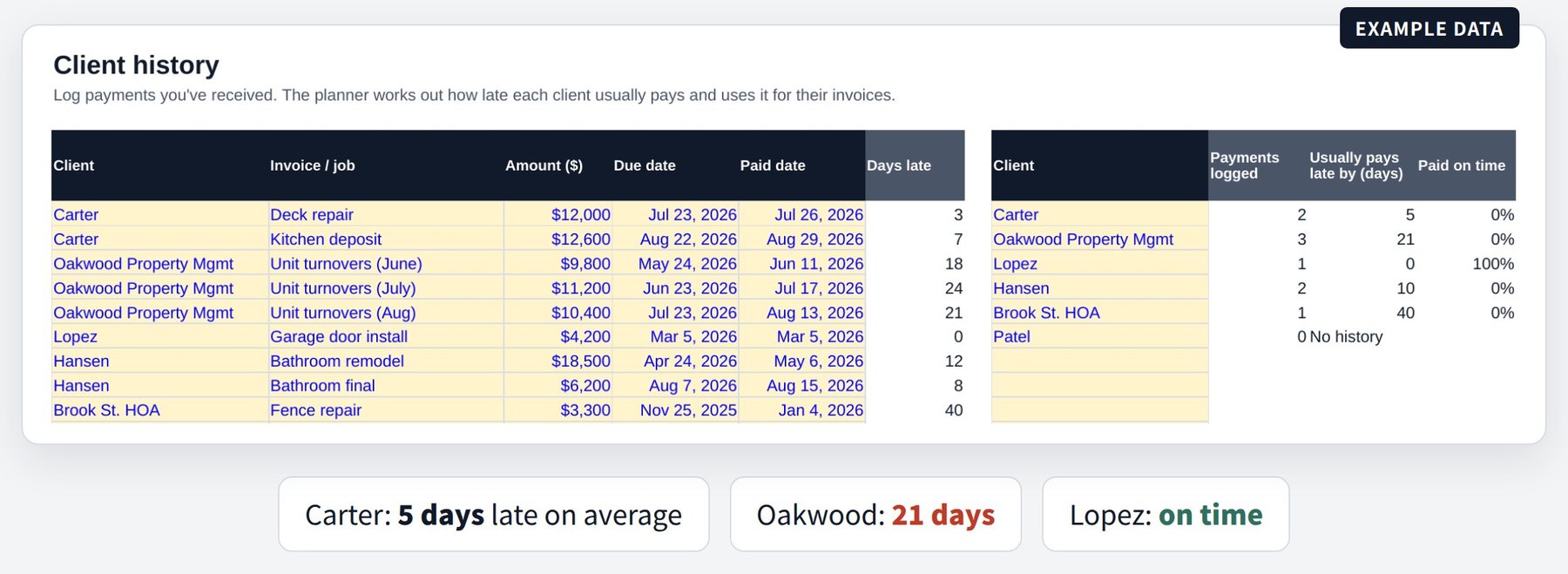
Know how late each client really pays.
Log a few past payments: when each was due and when the money actually arrived. The planner works out each client's usual delay and uses it to date their next payments. You can still type your own number for any job.
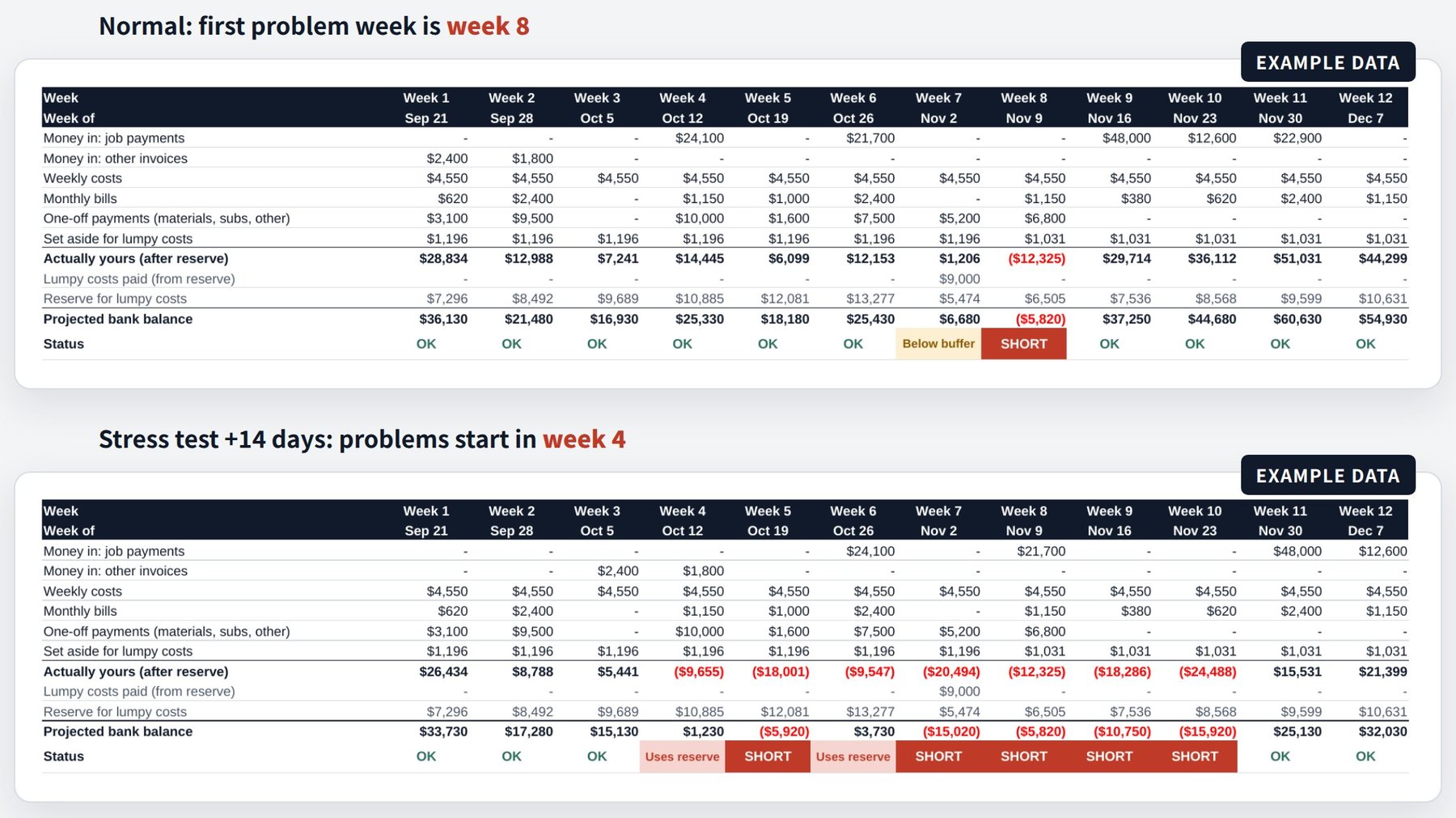
What if every client paid two weeks late?
Type 14 into one cell on the Forecast tab, and every payment you're expecting moves two weeks later. In the example, trouble starts in week 4 instead of week 8. Set it back to 0 for your normal forecast.
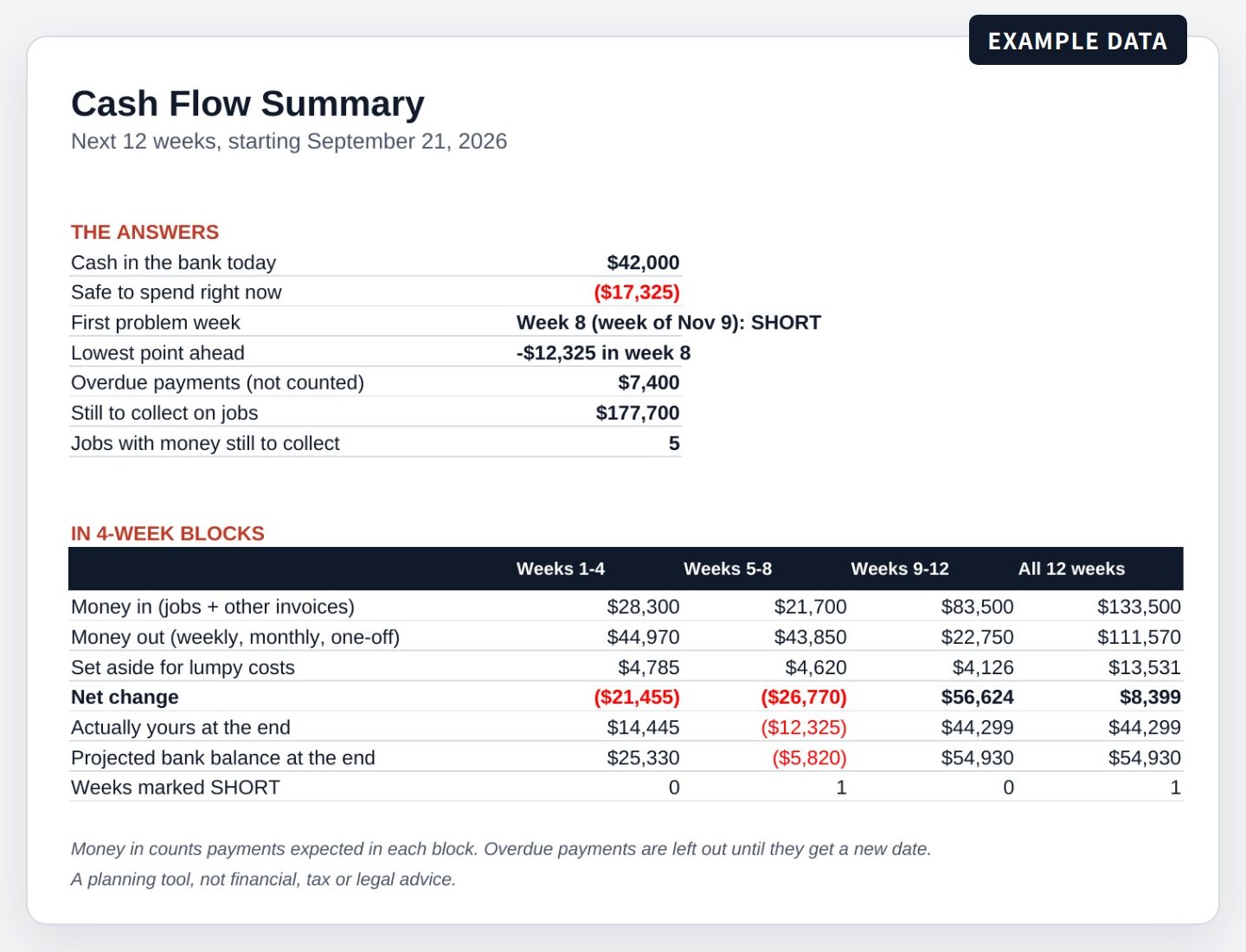
A one-page summary you can print.
The answers at the top, then money in and out in 4-week blocks. Handy for your accountant, your bank, or your own Monday check.
What you get.
- One spreadsheet file (.xlsx) with 8 tabs: Start here, Forecast, Summary, Jobs, Client history, Other income, Money out and Lumpy costs.
- An example business already filled in. Replace it with your own numbers when you're ready.
- A Start here tab that explains everything in plain English, plus a one-page PDF guide to opening the file in Excel or Google Sheets.
- Works in Microsoft Excel and in Google Sheets, which is free.
Questions.
Is this a subscription?
No. You pay $17 once and the file is yours. Depending on where you live, sales tax or VAT may be added at checkout.
How do I get the file?
Right after you pay. Your receipt email has a button to get your files, and you can use it to download them again later.
Does it work in Google Sheets?
Yes. Upload the file to Google Drive and open it with Google Sheets. The PDF guide shows how. We've tested it in Microsoft Excel and Google Sheets, but not in Apple Numbers.
Do I need to connect my bank?
No. It works only from the numbers you type in. No bank login, no accounting software, and your numbers stay in your own file.
I already use the free template. What changes?
Pro is built around jobs instead of single invoices, so you'd enter your numbers again: jobs on the Jobs tab, and other invoices on Other income. Money out and Lumpy costs work much the same way.
What if it isn't right for my business?
Send us a message within 14 days of buying and we'll refund you in full.
Can I share it?
Use it in your own business for as long as you like. Please don't resell or share the file.
Who makes it?
Runway, a one-person business in Korea. The planner and this page were made with AI assistance. Questions? Ask us.
See which week your cash runs short, before it happens.
One-time payment. Excel and Google Sheets.
The planner is a planning tool, not financial, tax or legal advice. Check important decisions with your accountant.